Website creation and redesign for holiday rentals
Holiday rental website: present the accommodation and receive direct bookings
A family does not choose only a beautiful house: it needs suitable sleeping arrangements, possible dates and an understandable price. Gloria creates or redesigns your holiday rental website to bring these answers together before contact. Photos of the whole property, stay conditions, access and availability form a coherent journey. We decide with you whether a booking request is sufficient or your organisation requires a connected booking engine.
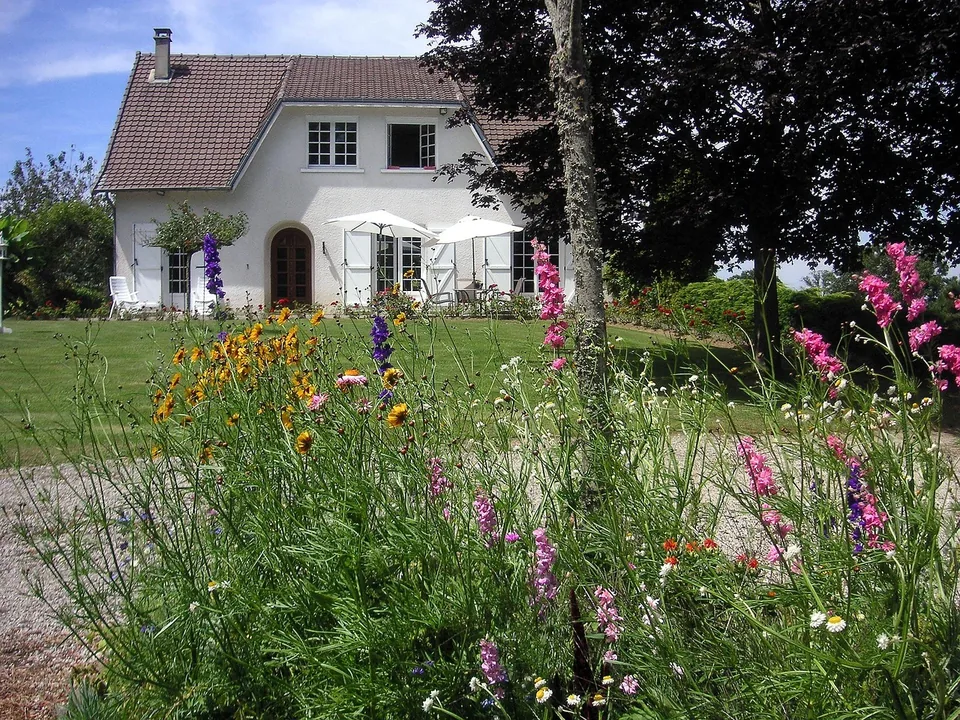
Your home for a week in the countryside
Discover the rooms, facilities and stay conditions, then provide your dates to check availability.
Request these datesYour information, photographs and services, ready to personalise.
Our method, before design
Holiday rental benchmark and keywords by destination, capacity and facilities
We first examine comparable holiday rentals, local results and platforms or websites answering the same accommodation needs. The benchmark covers capacity, surroundings, facilities and booking clarity. We connect these observations with your actual property, periods to fill and the value of a direct booking.
Phrases such as “family holiday cottage with garden”, “accessible holiday cottage Brittany” or “weekend holiday cottage rental” are possibilities to check. A feature such as accessibility must be precisely documented; we do not choose it simply to attract visits. Location and stated availability must also reflect reality.
We build useful pages around bedrooms, facilities, access and conditions using your own photos and accurate captions. Monitoring distinguishes enquiries, direct bookings and stay value. Data informs decisions without copying a competitor or creating pages for distant destinations. The quote defines competitor and query research; standard offers do not include unlimited tourism analysis.
The benefit for your business
Sleeping arrangements, facilities and booking requests for the right dates
- Show spaces, sleeping arrangements and facilities precisely to help travellers choose.
- Receive dates and the composition of the group in the first message, with relevant rules already visible.
- Keep a presentation in your own name, compatible with the platforms and tools you already use.
Your website in practice
Describe bedrooms, sleeping arrangements, facilities and stay conditions
A holiday rental website must explain what travellers actually book. Maximum capacity is not enough: three bedrooms with double beds do not meet the same need as six single beds. We organise information around concrete decisions: bed layout, bathrooms, kitchen, private or shared outdoor space, parking and any common areas. Visitors can check whether the property suits their group without reconstructing answers from a succession of photographs.
The property’s limitations belong in this presentation. Stairs to bedrooms, limited connectivity, a shared pool or no fencing are useful details to describe accurately. Stated accessibility must match characteristics confirmed by the owner; we never infer universal accessibility from a step-free entrance.
We also make conditions affecting the choice clear: whether pets are allowed, minimum stay, arrival days, check-in times and whether linen is supplied. This precision helps travellers picture their stay and reduces enquiries about arrangements you do not offer.
Build budget
Prices: brochure website, editable website or online sales
01
Simple brochure website
290 € excluding VAT
Build · standard configuration
Present your business and receive enquiries.
- Presentation tailored to your industry
- Content prepared from your information
- Mobile display and simple contact
- No administration area
02
Editable website / redesign
590 € excluding VAT
Build · standard configuration
Edit your content or modernise an existing website.
- CMS and standard functionality
- Content migration agreed in the quote
- Redirects prepared for a redesign
- Getting started and access handover
03
Online shop
990 € excluding VAT
Build · standard configuration
Sell using a proven e-commerce platform.
- Usable catalogue supplied by you
- Standard cart, payment and delivery
- Order journey tested
- Special integrations quoted individually
The quote confirms the scope before commitment. The client registers and renews the domain; initial connection is included. Choose hosting on your own account or hosting managed by Gloria, at an additional cost. E-commerce platform, applications and payment fees are not included.
These starting prices cover standard configurations. The quote specifies the selected functions, data migrations and integrations. There is no automatic surcharge per page: a synchronised schedule, stock management or a private area may require more work than a set of presentation pages.
Your website in practice
Create accommodation, pricing, availability and practical information pages
The homepage shows the property, its location and main attraction, then directs visitors to a detailed tour. The accommodation page brings together capacity, rooms and facilities. A pricing and availability page explains periods, applicable charges and how to book. A practical page answers arrival and access questions. Exploring the surroundings complements the stay with your personal recommendations.
If you operate several properties, each deserves a page with its own photos, sleeping arrangements, limitations and calendar. A comparison page helps people choose. We avoid creating a page for every nearby village with interchangeable descriptions: a route actually tested, a family-friendly activity or advice for arriving without a car provides more concrete information.
The menu keeps these pages easy to find on a phone. A traveller returning to check arrival times should not have to read the whole presentation again. For overseas visitors, we determine which languages are genuinely useful and have translated conditions approved. Relevant pages are added according to the content available; page count alone does not trigger an automatic surcharge.
Your website in practice
Booking request or online payment: choose according to your management process
A displayed calendar is not necessarily a calendar that prevents double bookings. We identify the authoritative calendar: your management tool, a platform or a manually maintained schedule. The website must explain what is confirmed and what still depends on your response.
On a small screen, scroll the table horizontally.
| Journey | When it is suitable | Point to check |
|---|---|---|
| Request by form | You personally confirm each stay. | The message states that dates are not yet reserved. |
| Link to your existing tool | Your engine already manages pricing, calendar and payment. | Travellers find the correct property and understand the move to another website. |
| Integrated booking | You want a connected journey from your website. | Availability, stay rules, payment and cancellations must be tested together. |
Calendar synchronisation may involve a delay; it must not be presented as guaranteed real-time availability. Connections, subscriptions and supplier fees are identified before commitment. The core website can remain simple; automating deposits, security deposits, multiple stays or complex pricing rules requires a separate scope.
Your website in practice
Example: a family wants to check a week in August
Fictional scenario explaining the journey. Two adults and three children are looking for a house for one week. The page first explains bedroom layout, then shows the dining table, outdoor space and parking. An attractive garden photograph catches their attention; a simple plan and captions then let them check sleeping arrangements.
The family opens the pricing page. They see the relevant dates, minimum stay, arrival day and inclusions. If cleaning or linen is offered separately, its arrangements are explained in the same place. The button leads to a form with the property already selected. Travellers enter arrival, departure and guest numbers. They can mention a pet if that changes your response.
After submission, the message confirms receipt of a request without promising a final booking. You check the schedule and reply with the applicable terms. This journey gives you the information needed to handle the stay; it requires neither a traveller account nor online payment if your business does not need them.
Your website in practice
Show the rooms and explain the stay price and extras
We prepare a selection of photographs rather than an endless automatic slideshow. An overall view locates the house; interior views show the main rooms; a few details answer practical questions. The kitchen, sleeping arrangements and outdoor space must remain identifiable on a small screen. Images are sized for the web and captions clarify potential ambiguities, especially shared space.
The demonstration photos on this page illustrate one way to present a holiday rental. They represent neither a Gloria client project nor your own accommodation. For your website, real property photographs take priority. We identify missing views so you can prepare a useful photo session, even with a phone in good conditions.
Pricing follows the booking logic: night or stay, applicable period, any occupancy basis, included services and additional charges you supply. An unexplained starting price creates another question. We favour a clear, dated price table with a named person responsible for updating it before the next season.
Your website in practice
Booking form: property, dates and number of guests
For an initial enquiry, useful fields are the property, dates, number of guests, name and a reply method. A telephone number can remain optional if you reply by email. We avoid asking for every guest’s name, identity documents or payment information at this stage. An optional message area allows a specific question without turning contact into an administrative dossier.
The form checks date and contact formats server-side, limits abusive submissions and provides understandable error feedback. Discreet spam protection is included; entered details should not disappear at the first typing error. The website explains data use and the owner determines who can view it and how long it is retained.
We also test acknowledgements and failure handling within the agreed scope. “Sent” text alone does not prove an email arrived: receipt is verified with you before this process is considered approved.
Your website in practice
Redesign: preserve pages cited in brochures and confirmations
An old website may be cited in a tourism listing, confirmation email or brochure. Before redesign, we record important addresses and pages already visited. A property page changing address receives a permanent redirect to its relevant new page. Old pages are not all sent to the homepage, which would prevent visitors finding the information they sought.
Still-useful content, authorised photographs and booking links are retained after checking. We pay particular attention to seasonal changes, old promotions, embedded calendars and platform links. If an offer has disappeared, its treatment depends on what genuinely replaces it. The migration plan keeps a clear mapping between old and new addresses.
We complement this work with descriptive titles, useful internal links and verified indexing. Local SEO can then develop visibility within your actual area. The website presents your address and surroundings accurately without inventing locations in several destinations.
Your website in practice
Test mobile booking and learn to update the website
Before publication, we follow a complete stay journey on a phone: understand sleeping arrangements, find a price, consult conditions and send a request for the right dates. An impossible date, too-short stay or unavailable property must produce a response consistent with the chosen operation. Where an external engine is involved, its links, languages and confirmations form part of the agreed checks.
You approve property information and stay rules. We check images, links, forms, missing pages and main redirects. Handover includes useful access and the agreed update method. It must be clear who changes the calendar, prices and restrictions: a polished website cannot compensate for an abandoned schedule.
To scope the project, provide your current website address, available photos, number of properties and booking tool name. We can then distinguish the presentation website from necessary connections and propose the appropriate level from our creation and redesign offers.
Domain, hosting & maintenance
Who manages the website after handover?
You register and renew the domain name
You register, pay for and renew your domain name directly. Gloria connects it to the website initially as part of launch. The registrar account and renewal reminders remain under your control. Subsequent one-off assistance can be quoted separately.
Hosting and maintenance: options and prices to specify
You can retain compatible hosting or choose hosting managed by Gloria at an additional cost. The quote specifies recurring costs, backups, updates, included interventions and exit terms. Subscriptions to booking tools, platforms or paid extensions are identified before commitment.
Practical questions
Questions about functionality and website creation
Can we keep Airbnb, Booking or another tool?
Yes. Your website can complement platforms and link to an existing booking engine. Synchronising availability requires checking your tool’s functions and update delays; it is not assumed to be included in a simple brochure website.
Is online payment required to receive direct bookings?
No. You can start with a date request, then personally confirm the stay according to your procedure. The button and confirmation message must distinguish an enquiry from a firm booking.
What should we prepare before creating the holiday rental website?
Real photos, sleeping arrangements, facilities, stay rules, pricing and availability, plus your contact details and current tools. Documents and notices applicable to the accommodation are supplied or approved by you.
Explore also
Our website offers for related industries
Compare journeys in these related activities to identify functions useful to your project.
Explore the 49 industries →Let’s discuss your project
Request a quote to create or redesign your website
Describe your business, services to highlight, current website address and tools already used. We can distinguish standard configuration from particular functions, then provide a quote with a precise scope.
Request a quote