Websites by industry
Website creation and redesign by industry
Your future customers need to find the right information and know how to act. Explore the journeys, content and functions to plan for your industry.
49 industries to explore
Explore the pages dedicated to your industry
Beauty & wellbeing
Appointments, services and trust.
Trades & construction
Projects, interventions and quote requests.
Automotive & mobility
Services, appointments and qualified enquiries.
Restaurants & accommodation
Menus, stays and reservations.
Services & professions
Expertise, engagements and initial contact.
Retail & creative services
Products, portfolios and personalised orders.
Sport & training
Sessions, registrations, programmes and initial conversations.
Business & household services
On-site services, logistics, availability and quotes.
Create or redesign
Create a first website or rebuild an existing one: work to plan
Create your service pages and contact journey
We organise your services, practical information and the path to contact, booking or purchase. Copy and visuals start from information you approve.
Migrate content, functions and old addresses
We examine content to retain, functions in use and old addresses. The redesign prepares migration of the existing website and redirects specified in the quote.
Examine your booking system, customer area or industry software
A booking tool, customer area or industry software can change the scope. We distinguish a simple link to a tool from its technical integration.
An example of our work
Choose service and local pages: a garage example
Work starts with your actual services, then competitor research and customer searches. In particular, we compare what they explain before contact: vehicles accepted by a garage, durations and conditions at a salon, or delivery arrangements for a hire business. The aim is to identify answers missing from your website and functions needed to act.
Consider a fictional garage with a single workshop. It offers routine maintenance and fault diagnosis but does not carry out body repairs. Its website can address several distinct needs without inventing locations or presenting services it does not provide.
Scroll the table horizontally to read all columns.
| Page to consider | Information specific to this page | Next action |
|---|---|---|
| Vehicle maintenance | Services offered, vehicles accepted and information needed to prepare the appointment. | Specify the vehicle and maintenance required. |
| Fault diagnosis | Symptoms to describe, limitations of remote diagnosis and the service process. | Explain the problem and request an appointment. |
| Getting to the workshop | Actual address, hours, access, parking and vehicle drop-off arrangements to confirm with the garage. | Prepare the visit. |
| Questions before the appointment | Documents to bring, vehicle availability and any special requests to mention. | Read the answers, then go to the relevant service. |
Decide when a town page provides an additional answer
A local page is justified by what it changes for the customer. A second workshop may have a different address, hours, team and services. A business working at customers’ premises can explain the area actually served, travel constraints and authorised local projects. These elements must be verifiable and sufficient for the page to be useful in its own right.
In the single-garage example, replacing the town name in twenty texts would not provide more information about maintenance or access to the workshop. A complete directions page and detailed service pages provide a more coherent foundation. Google’s rules on doorway pages notably target geographical pages that mainly act as intermediaries to the same destination; our editorial approach examines the actual usefulness of each page.
We therefore prepare a plan stating, for each proposed URL, the need addressed, specific information, useful links and person approving the facts. If a page has no distinct substance, it is combined with a more complete page or postponed. The final number follows from this plan. The quote specifies the planned research and production, including language and market adaptations where needed.
To help you decide
Choose functions according to the need: quotes, booking or sales
Choosing a website does not begin with the number of pages. It begins with an action useful to your business: receiving an actionable project enquiry, booking the right service, presenting an engagement or selling a product. Once that action is defined, we can choose the necessary information, screens and tools.
Scroll the table horizontally to read all columns.
| Your main need | Configuration to examine | Point to clarify before the quote |
|---|---|---|
| Present a stable offer and receive enquiries | Simple brochure website without administration. | Who will change hours, prices or services, and how often? |
| Update services, articles or completed projects | Editable website with page templates. | What information must your team be able to edit itself? |
| Take bookings through an existing calendar | Presentation website connected to your tool. | Is a link enough, or must availability be displayed and synchronised? |
| Sell and take payment online | Shop with a catalogue and order journey. | Which products, payments, deliveries and stock rules must work together? |
| Modernise a website that already receives visitors | Redesign with migration and migration checks. | Which pages, enquiries and functions must be preserved? |
A business can combine several needs. A restaurant may present its menu, take reservations and sell gift vouchers; these three journeys do not necessarily require bespoke development. We distinguish what is essential at launch from what can be added later, with a written scope for each function.
To help you decide
Example: a plumber’s website focused on bathroom renovation
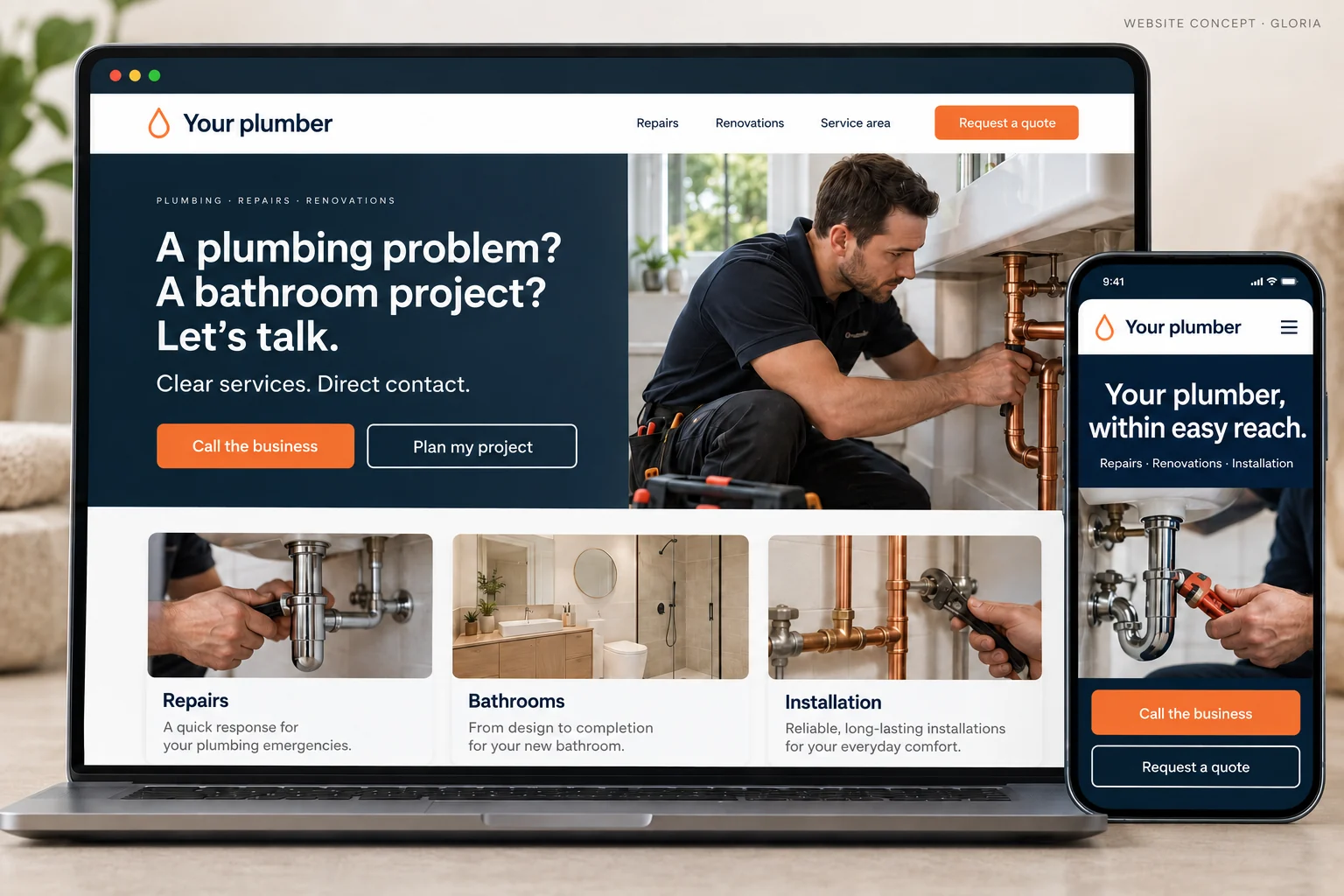
Consider a fictional plumbing business that wants more bathroom renovations. A page listing every possible job is not enough to explain why customers should entrust this project to it. The website must help visitors recognise their situation, understand the service and prepare an initial conversation.
1. Present the work, constraints handled and area served
The page presents the type of work, constraints handled and actual service area. Authorised project photographs can show an installation, a finish and the overall result. Captions explain what was done and the engagement’s limitations. Illustrative images may complement the presentation; they must not be presented as the company’s completed work.
2. Explain the work stages and information required for a quote
Visitors may want to know whether the business handles a complete renovation, equipment replacement or plumbing only. These answers appear before the quote request. If an exact price requires a visit, the website explains the factors influencing the quote instead of displaying an artificially precise amount.
3. Ask for the information needed to assess the project
The form asks for the project type, location and a way to respond. Further details can follow during the conversation. Submission displays a clear confirmation and the message must reach the intended workflow. Testing covers this complete journey, not merely the presence of a button. The page for plumbers details choices specific to this industry.
To help you decide
Hairdresser, garage, restaurant: content and functions to adapt
Scroll the table horizontally to read all columns.
| Business | Visitor’s decision | Useful content or function |
|---|---|---|
| Hair salon | Choose a service compatible with their needs. | Explained service menu, salon-approved prices and durations, style examples and access to the right calendar. |
| Car garage | Find out whether the vehicle and work are accepted. | Services, information needed for initial contact, vehicle drop-off and appointments. |
| Restaurant | Check the offer before booking or visiting. | Mobile-readable menu, service days, location and reservation terms. |
| Hotel or campsite | Compare a specific stay. | Differentiated accommodation, facilities, availability through the selected tool and stay conditions. |
| Professional firm or consultant | Understand whether the engagement matches the problem. | Situations addressed, method, deliverables, scope limitations and a qualification conversation. |
Industry alone does not determine everything. Two salons may operate differently: one accepts walk-ins, while another requires a consultation for certain techniques. Two tradespeople may target households or building managers. Industry pages help prepare these decisions; your website reflects your actual operations, approved with you.
This thinking also applies to images. A detailed photograph can explain a skill; an overall view can reassure visitors about a place; an example deliverable can make an abstract engagement understandable. The visual is chosen for what it helps explain, with quality and file size suited to the screen.
To help you decide
What to provide: services, prices, photographs, customer questions and existing tools
You do not need a complete technical specification to start. A useful file brings together your offer, target customers, questions that recur before a sale and available content. We then identify what can be reused, what needs writing and what requires your approval.
- Your priority services, the enquiries you accept and those outside your scope.
- Prices or pricing rules you want to publish, without invented estimates.
- Usable photographs and testimonials, with the necessary permission and an accurate description.
- Your current tools: calendar, messaging, catalogue, payment, till or industry software.
- For a redesign, important pages and difficulties experienced by customers or your team.
We can prepare copy from this information. You check facts specific to your business: services, guarantees actually offered, qualifications, availability and terms. Missing content is flagged before publication. A service page can be detailed while remaining easy to read, with explicit headings, examples and links to related topics.
To help you decide
Before publication: test contact, administration, orders and old URLs
Acceptance follows the uses specified in the quote. On a brochure website, we test understanding of the offer and contact. On an editable website, we also check a routine change by the person who will make it. On a shop, we follow an order with the agreed payment and delivery conditions.
For a redesign, important old addresses need explicit treatment: preservation, redirection to an equivalent page or deliberate removal where no relevant answer exists. Redirecting every old page to the homepage does not replace this work. Forms, links, images and mobile versions form part of handover checks.
After publication, a website is managed using useful observations: enquiries received, project relevance, reported difficulties and pages viewed where measurement is available. A creation service does not automatically include permanent marketing support. Responsibilities for updates, backups and maintenance are defined separately in the offer terms.
Build budget
Prices for a brochure website, editable website or shop
01
Simple brochure website
290 € excluding VAT
Build · standard configuration
Present your business and receive enquiries.
- Presentation tailored to your industry
- Content prepared from your information
- Mobile display and simple contact
- No administration area
02
Editable website / redesign
590 € excluding VAT
Build · standard configuration
Edit your content or modernise an existing website.
- CMS and standard functionality
- Content migration agreed in the quote
- Redirects prepared for a redesign
- Getting started and access handover
03
Online shop
990 € excluding VAT
Build · standard configuration
Sell using a proven e-commerce platform.
- Usable catalogue supplied by you
- Standard cart, payment and delivery
- Order journey tested
- Special integrations quoted individually
The quote confirms the scope before commitment. The client registers and renews the domain; initial connection is included. Choose hosting on your own account or hosting managed by Gloria, at an additional cost. E-commerce platform, applications and payment fees are not included.
Let's discuss your website
Request a quote specifying your industry and desired functions
Tell us your industry, your current website if you have one and what visitors should be able to do. We will respond with a scope and quote.
Get my quoteYour clients, your market
Languages and markets: France, Belgium, Luxembourg, Switzerland and Canada
France, Belgium, Luxembourg, French-speaking Switzerland, Quebec or English-speaking Canada: let’s clarify the languages, practices and information needed for your project.
Choose my marketYour project in practice
Lawyers and notaries: check rules for content, advertisements and forms
For a lawyer, notary or another regulated profession, professional references form part of scoping. Messages, reviews, advertisements, domain names and forms are examined according to the profession and jurisdiction.
Read the rules and implications by country →